


Multilink Review Tap Card for Google & Social Media Sign,NFC QR Sign Plate
Multilink Review Tap Card for Google & Social Media Sign,NFC QR Sign Plate
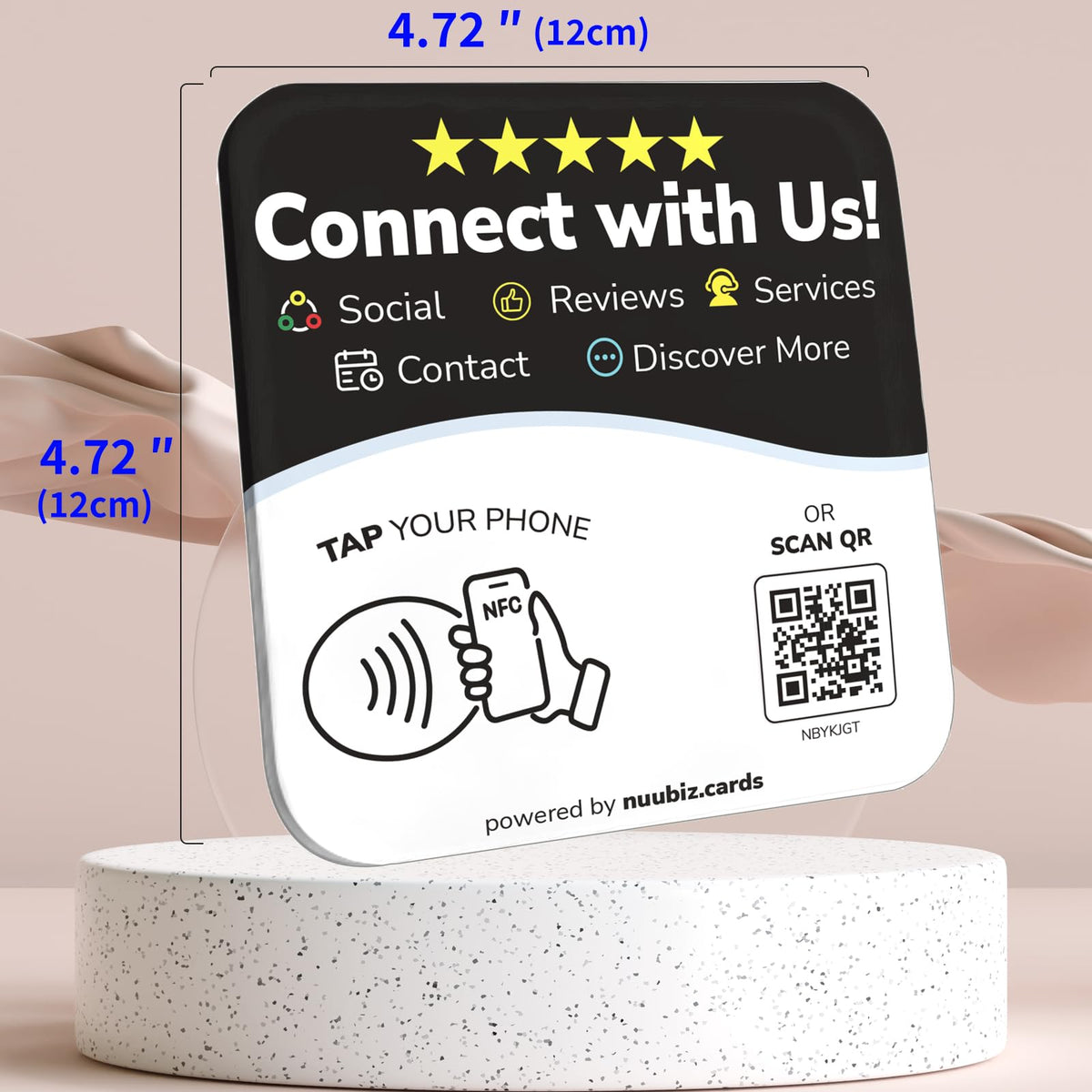
Acrylic Multi-Link Plate for Instagram, Facebook, WhatsApp, Booking Pages & Websites. Includes a stand and adhesive backing for flexible placement.
🚀 Put All Your Business Links in One Place!
🔗 Make It Easier for Customers to Find, Follow & Book You
📈 Connect More Visitors With Your Website, Socials & Services
☝️ No App. No Monthly Fees. No Per-Scan Charges.
🏆 Ideal for Restaurants, Retailers, Creators & Service Businesses
Couldn't load pickup availability
- Free Shipping
- 30-Day Risk-Free Trial
- Easy & Free Return
Product Details
Product Details
- Note: When using adhesive mounting, avoid metal surfaces. All-in-One Review & Social Media Sign: Combines a Google Review Tap Card and Social Media QR Code Sign – one sleek acrylic plate connects customers to your Google Reviews, Instagram, Facebook, WhatsApp, booking page, or website. No more switching signs or cluttered counter
- Quick Setup with Personalized Branding: Activate in minutes: scan the QR code, enter your unique code, upload your logo, intro, and all your links. Whether it’s a review us button, Instagram QR code, Facebook QR code, or tap to book – your digital hub is live fast
- Built-in Tap & Scan Analytics: Curious how many people tap or scan? The plate collects total interaction counts – giving you a basic insight into usage and engagement. No app or login needed
- No App Required, No Subscription Fees: No apps to install, no monthly payments. Just tap or scan to connect – review us, follow us, book now, or visit our site – it’s your digital hub, always live and maintenance-free
-
Acrylic Display with Stand & Adhesive Backing, Ideal for Multi-Business Use: Made from premium acrylic (4.72" x 4.72"), Designed for salons, cafés, pop-ups, retail shops, and service providers. Whether you're collecting reviews, sharing a portfolio, or booking appointments, this multi-business QR Code & NFC sign makes it seamless
Business Uses & Industries
Business Uses & Industries
Bring Your Online Presence Into the Places Where Business Happens.
Your customers are already interacting with your business in person. Give them a convenient next step with a NUUBIZ display. Whether you want to direct someone to a review page, introduce your social profile, share a payment destination, or bring several business links together, choose a product that fits your needs and put it where people are most likely to use it.
Your linked destination depends on the product you choose. For supported products, you can manage your links online and make updates without replacing the physical display.
🍽️ Restaurants & Coffee Shops
From dining tables to checkout areas, give guests a convenient way to reach the online destination you choose for your business.
🛍️ Shops & Retail Counters
Place your display where shoppers pause to pay, ask questions, or learn more about your store. Make your selected online destination easier to find.
💇 Hair, Beauty & Personal Care
Position it at your reception desk or checkout area so clients can conveniently reach your chosen review, booking, social, or other supported page.
🏨 Lodging & Guest Accommodation
Use it in suitable guest-facing areas to provide quick access to the information or online destination supported by your selected product.
🏢 Studios, Offices & Consultation Spaces
Add it to reception areas, meeting rooms, or client service desks to help visitors connect with your business online.
🏋️ Gyms, Classes & Activity Venues
Place it near check-in or other visitor areas to help people access your selected business page or supported online destination.
🎟️ Events & Visitor Service Areas
Use it at registration desks, information points, and other locations where attendees may need a convenient way to reach your online information.
✨ A Fit for Many Business Environments
Choose the NUUBIZ product that matches your space, the links you want to share, and the way you serve your customers.
Shipping & FAQs
Shipping & FAQs
🚚 Free Shipping: On orders over $25
📦 Estimated Shipping Time: 3–7 days
↩️ Shipping & Returns: https://www.nuubiz.cards/policies/refund-policy
Frequently Asked Questions
🔹 1. Who creates the QR code?
NUUBIZ creates a unique QR code for each product, linked to its designated online destination.
🔹 2. Can I change my links after purchase?
Yes. Products with NUUBIZ dynamic QR codes let you update your linked destination through your online dashboard without replacing the physical product. Custom products using your own static QR code may not support link changes.
🔹 3. Can I add multiple links to my product?
It depends on the product. Single-link products direct visitors to one destination, while Multi-Link products support multiple destinations on one page.
🔹 4. How do I activate my product?
Follow the included instructions to activate your product and manage its destination through your NUUBIZ dashboard.
🔹 5. Can I customize a standard product?
Yes! Customization options may be available for standard products. Contact us at support@nuubiz.com to discuss your requirements.
🔹 6. Where can I get help?
Contact us at support@nuubiz.com for assistance with your order or product.



Why Businesses Love It

Put All Your Business Links in One Place
Stop making customers search across different platforms. Give visitors one convenient page to access your website, social profiles, booking page, menu, payment links, and more
🔗 Replace Multiple Signs with One
Bring your selected business links together on a single page instead of displaying separate QR codes for every destination.
⚡ Send Visitors Where They Need to Go
Let visitors choose the right link, whether they want to book, browse, follow, or contact you.
🔄 Update Links as Your Business Changes
Manage supported dynamic QR destinations through your dashboard without replacing the physical product.
📲 Make Every Visit More Useful
Give customers convenient access to the information and actions that matter most to your business.
You May Also Like
- Featured
- Most recent
- Highest ratings first
- Lowest ratings first
- Show photos first